User guide for schools (PDF) · User guide for families (PDF)

For pupils
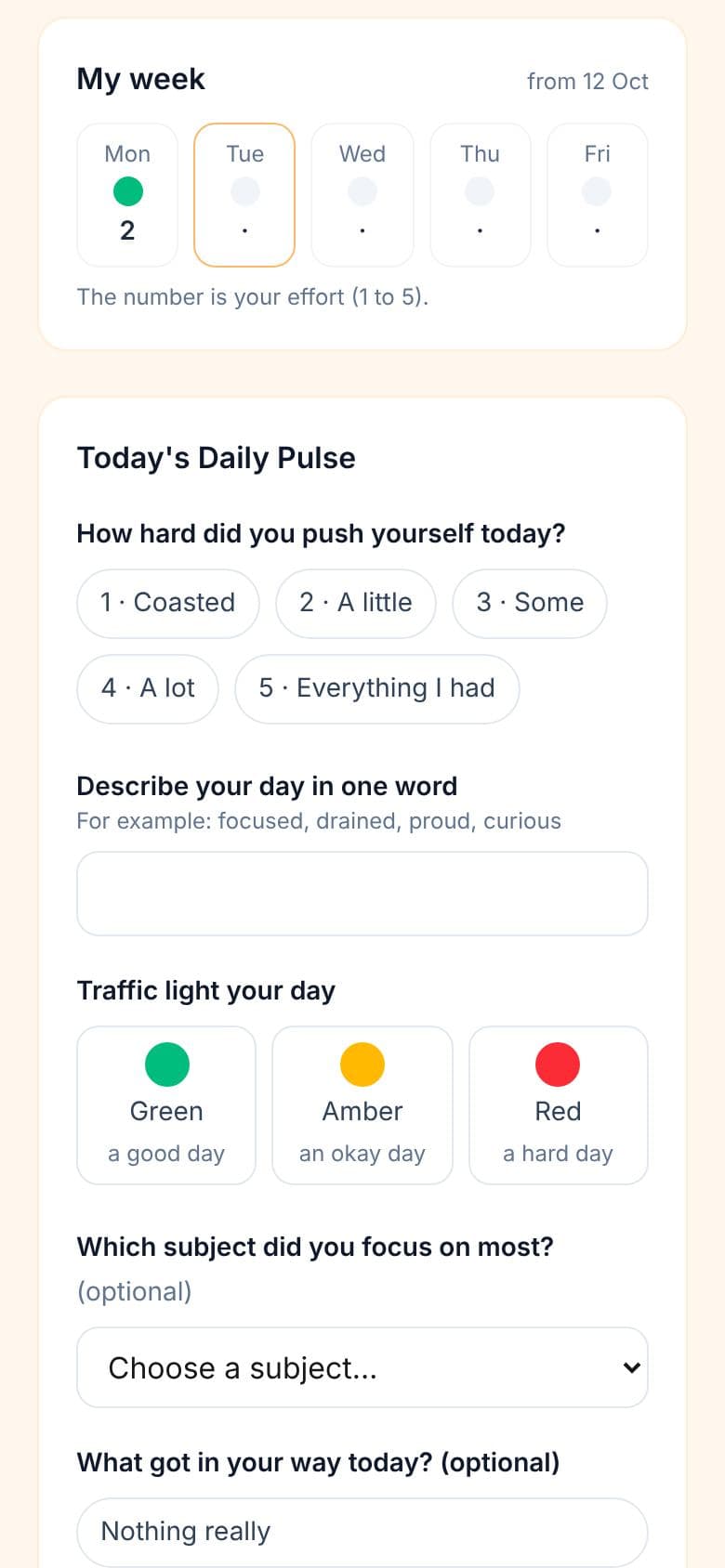
A private link each, with no password. The Daily Pulse takes under two minutes; the Friday Reflection about ten; a GPS Check for each topic or test. Pupils learn to plan, not just to work.
For form teachers
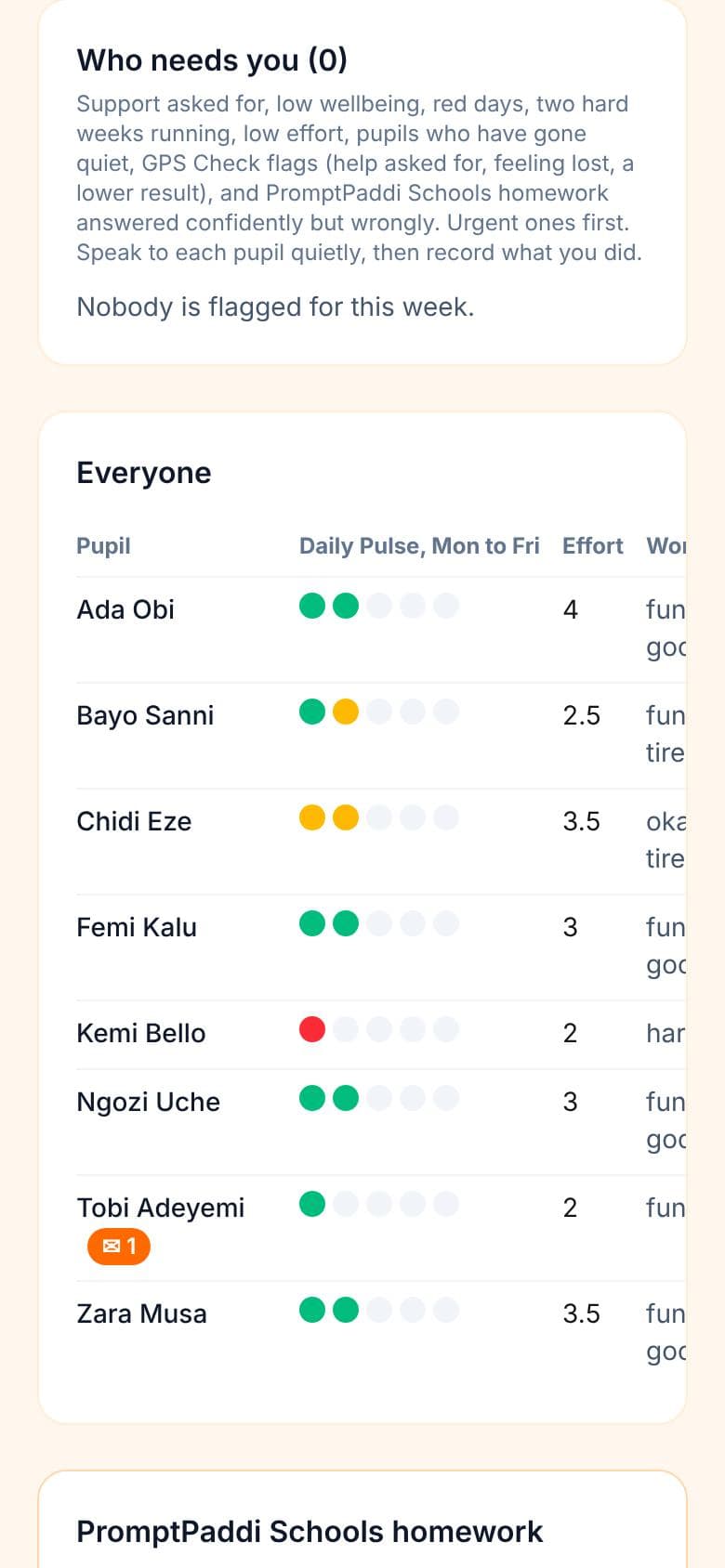
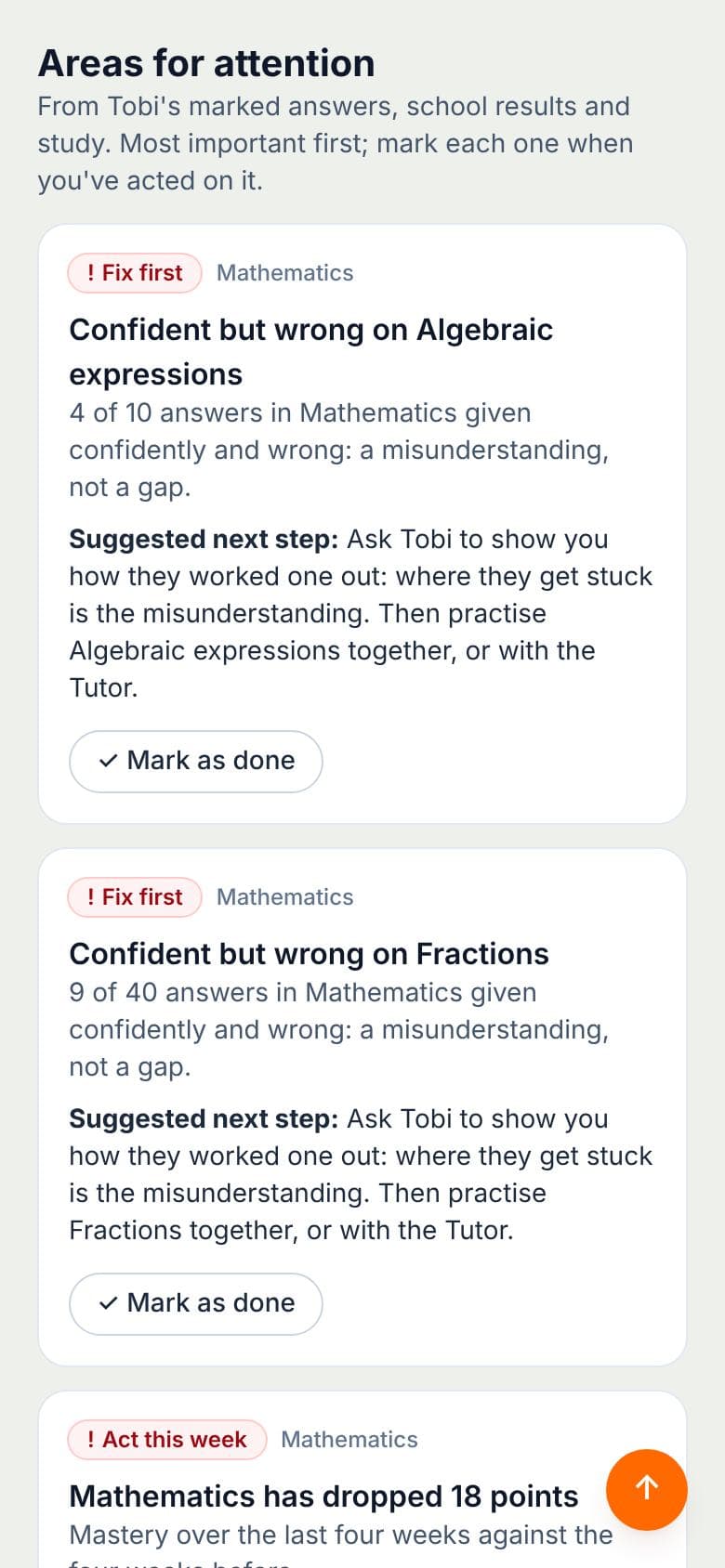
A Monday list for the class: who asked for help, who is struggling, who had a hard week, and who has gone quiet, and the pupils who feel lost in a topic. Urgent ones first, with a note of what you did.
For the school
Class links for each form teacher, printable QR slips for pupils, and a named safeguarding contact who hears at once when a pupil needs to talk.

What pupils answer
Daily Pulse · every day
- How hard did I push myself today? (1 to 5)
- My day in one word
- A traffic light: green, amber or red
- The subject I focused on, and what got in my way (optional)
Friday Reflection · once a week
- My biggest win, and what was hardest
- My effort pattern this week, and the strategy that helped most
- One thing I will do differently next week
- How my week felt (1 to 5), and whether I need my teacher
Monthly progress · the Academic Progress Monitoring Toolkit
- Form teachers record each pupil's month: grades against target, the latest assessment score, attendance, behaviour incidents and four effort ratings, with a Priority Comment
- Pupils complete a monthly check-in: an eight-point self-regulation scale, a six-area wellbeing check-in and a SMART goal
- Six trigger rules flag who needs a Parent-Student-Teacher meeting, to be held within 5 school days: two subjects declining two months running (T1), attendance below 90% (T2), three or more behaviour incidents (T3), a gap of two grades in a core subject (T4), self-regulation below 2.5 (T5), and a wellbeing score below 2 (T6), which goes to your safeguarding contact at once
- Leaders see each class's month: triggers by rule, meetings held on time and overdue, and the average time from trigger to meeting
GPS Check · for each topic or test
- Where am I now? What I understand, how confident I feel, and what I find most difficult
- Where am I going? My goal and the grade I am aiming for
- How do I get there? Two or three strategies, what gets in the way, and my effort outside lessons
- My next steps: one priority action this week, and whether I need my teacher
- After the result: my score, which strategies helped, what I will do differently, and whether I am on track
How it works
- Add Learning GPS from your school dashboard, and pay by Paystack or bank transfer.
- On your school dashboard, name your safeguarding contact and make a class link for each form teacher, from the classes on your learner roster.
- Each form teacher prints their pupils' link slips. Pupils scan the QR code and add the page to their home screen.
- Start with the Daily Pulse only for two weeks, so the habit forms. Then open the Friday Reflection, and from about week four the GPS Check.
- Every Monday, form teachers open their list, speak to the pupils who need them, and record what they did. Share the anonymous class patterns in class, so pupils see their answers change what happens.
Safeguarding and privacy
Only the class's form teacher sees what pupils write. When a pupil asks to talk to someone about how they are feeling, or rates their week 1 (struggling), the form teacher and your safeguarding contact are emailed straight away. Learning GPS supports, and never replaces, your school's safeguarding procedures. Your school handles parents' consent under the Nigeria Data Protection Act 2023; see our privacy notice.
Prices
A term at a time, for each pupil, so you can add it to your Homework Tracker order each term.
| Learning GPS on its own | ₦1,500 a pupil, a term |
| Homework Tracker and Learning GPS together, in one order | ₦4,000 a pupil, a term |
| More than 5,000 pupils, or a group of schools | Ask us for a quote |
Pay by card, bank or USSD with Paystack, or by bank transfer. Renewing early adds a term from your end date. If your roster grows, add the new pupils for the rest of the term.
New to PromptPaddi Junior?
Get Homework Tracker for your class or school, and tick "Add Learning GPS?". One order, one payment.
Buy for my class or schoolAlready have a teacher or school account?
Add Learning GPS from your dashboard in a few minutes.
Add it from my dashboardLearning GPS on its own
Just want the daily check-ins and the Monday list, without Homework Tracker? Buy Learning GPS on its own here, for a term. Tell us your classes and how many pupils are in each: you pay for each pupil, above.
1Who is buying?
2Your classes
Add each class name and how many pupils are in it. Learning GPS is priced for each pupil, a term at a time.
- students
0 students · add 1 more to reach the minimum of 1
More for your learners
3Your details
Your order
Choose who is buying.
Your account comes with it: we make it when you pay, and you set your password straight after, so every class link and renewal is kept in one place.
On the progress dashboard
The whole child: confidence, effort, wellbeing and what they are stuck on.
Every PromptPaddi Junior product adds to one progress record for each child, which parents, teachers, schools and the child can see: strengths, gaps, progress week by week, and what to do next.
For families
My Learning GPS at home
If your child's school does not use Learning GPS, you can use My Learning GPS at home, from your PromptPaddi Junior parent dashboard. The families' user guide (PDF)
Children aged 10 and over
Their own private link, with a QR code: the Daily Pulse, the Friday Reflection and a GPS Check for each topic or test. You see their week on your dashboard, with anything that needs you at the top, and keep your own notes. Each month, keep their progress dashboard: grades against target, attendance and behaviour, with the trigger rules telling you when to ask the school for a meeting.
Children under 10
The Weekly Learning Chat: seven questions you read aloud together, about five minutes once a week. What went well, what was tricky, and what colour school was this week. You see the weeks build up, and what to follow up.
| Each child | ₦1,500 a term |
For PromptPaddi Junior families. Already subscribed? Your first term of My Learning GPS is free: start it from your parent dashboard.
Get Learning GPS for your family
Your child's first name and your email, then pay. Your account is made when you pay. Already have one? Sign in.
Learning GPS for your family · ₦1,500 a child, a term
Two minutes a day noticing how they learn, with a weekly chat for the family. A term covers each of your children. What is Learning GPS?
Add your child's first name at the top.
Card, bank or USSD with Paystack. We make your account when you pay, and email you everything.
Learning GPS and My Learning GPS © PromptPaddi Limited, part of the ASEF™ Accountability and School Excellence Framework. Proprietary. All rights reserved.